Four attendance punches
Record punch in, break start, break end, and punch out, with optional notes. Each punch authenticates the employee and signs them out afterward.
Track attendance, review hours, and prepare payroll in one workspace. Explore the features built into Timeclock, from the first punch to a saved pay-period record.
PUBLIC RELEASE COMING SOONNames, attendance status, and the latest punch times come together on the daily board.
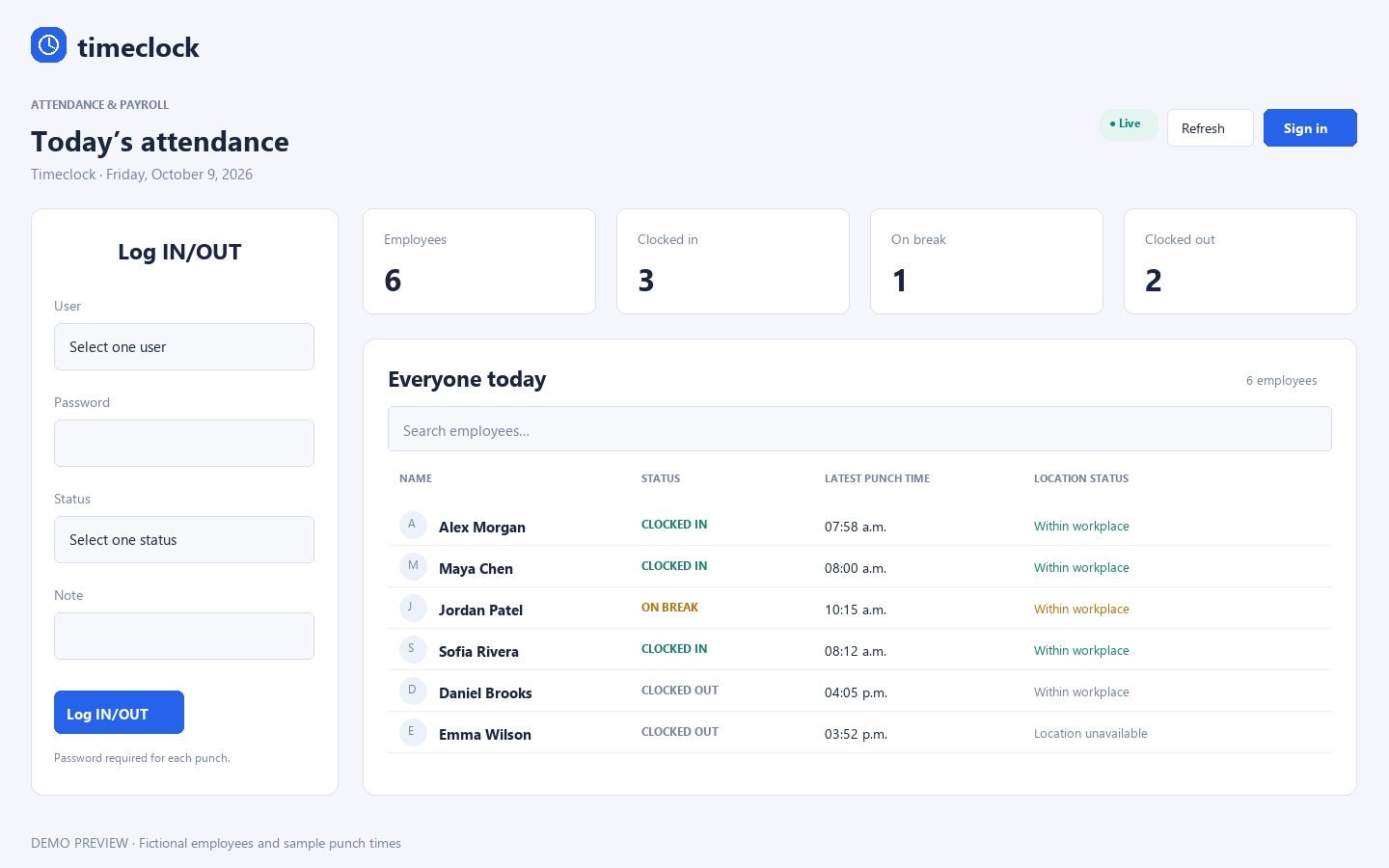
Watch an employee punch in on a tablet at the workplace.
Illustrated demonstration using a fictional employee. Select your name, enter your password, choose Punch in, and tap Log IN/OUT. No real attendance is recorded.
Follow the working day, from the first punch to the last.
Record punch in, break start, break end, and punch out, with optional notes. Each punch authenticates the employee and signs them out afterward.
See who is in, out, or on a break, together with the latest punch and its location status. Search, refresh, and automatic 30-second updates keep the board useful.
Record each break-and-return pair separately. Recorded unpaid breaks are included in the calculation of working hours.
An employee can punch out even when they forgot to punch in. The end is saved immediately; their reported start time goes to an administrator for approval.
Store start and end times and recurring workdays. Compare scheduled hours with worked hours by day, week, and pay period. Early punches retain the actual time while paid hours follow the schedule unless early work is approved.
Bring exceptions into view so they can be reviewed.
Configure whether recorded breaks are unpaid. Paid-break positions, including drivers, can use punch in and punch out without required break punches.
Review suggested 30-minute break times and apply confirmed corrections to eligible completed shifts. Existing breaks, shorter shifts, paid driver breaks, and incomplete shifts are skipped.
Missing or out-of-order punches, late arrivals, short or late breaks, and pending corrections are flagged. Employees needing attention appear yellow in reports; failing punch fields stay red.
Request device location and compare it with the configured workplace radius. Offsite, uncertain, and unavailable results are saved for review. A separate location check does not create a punch.
Attendance boards display location status; precise coordinates, maps, distances, and accuracy details are restricted to the administrator view. Device location is supporting evidence and may be inaccurate.
Keep the team, its roles, and its working rules together.
Manage names, usernames, agency, position, hourly rate, scheduled start and end times, workdays, and hire dates.
Change values directly in the employee table and save all changes in one action. Filtering preserves unsaved edits.
Manage payment agencies and job positions, assign employees, and configure position-specific paid-break rules.
Record hire dates and quit or fired departure dates. Former employees retain attendance and payroll history and can be restored; restoration leaves the account disabled until enabled.
Employee, Employee Creator, and Administrator roles separate punching, limited employee creation, and management. Reports, payroll, corrections, and settings require administrator access.
Configure the company name, timezone, payroll Sunday anchor, workplace location, allowed radius, and break-deduction policy.
Turn attendance records into something you can work with.
Review daily attendance, hours worked, and two-week payroll periods, with Sunday–Saturday weekly sections and daily, weekly, and period totals.
Filter reports by employee, agency, position, search text, and date range. Compare expected hours with actual hours and see the difference.
Export detailed punches, weekly summaries, and paid-payroll summaries in CSV format for spreadsheet workflows.
Create an XLSX agency report for a chosen date range with editable pay and tax formulas, agency subtotals, matching colors, weekly totals, an 88-hour comparison, and yellow flags for missing information.
Find employees, agencies, positions, pages, and saved pay dates from the top search bar. It supports small spelling mistakes, case and accent differences, and keyboard navigation.
Move from employee setup to reviewed calculations and saved records.
A single Payroll menu brings together the overview, employee setup, run payroll, calculations and fixes, pay history, reports, two-week payroll, weekly totals, and Excel agency reports.
Save annual employee tax settings and verified opening year-to-date balances. Partial setup stays visible as incomplete.
Enter reviewed gross earnings or regular hours, overtime hours, rates, vacation paid, and holiday paid. The current module previews supported 2026 Ontario income tax, CPP, CPP2, EI, net pay, and employer contributions for directly paid employees.
Highlighted fields and correction links help fill missing payroll inputs or resolve employee and attendance issues. Partial drafts are saved; net pay stays blank until required information is complete.
Use repeating Sunday–Saturday, 14-day earning periods, paid on the following Friday. The default report loads the prior completed period.
Save draft or paid records, inspect earlier versions, and create a new version after corrections. Marking a period paid records a payment already made; it does not send money.
With verified opening balances and complete payment history, later calculations use earlier paid-period records. Drafts do not count, and corrections to earlier paid periods trigger another review.
Report on saved paid periods and export deduction and employer-contribution summaries. The app checks official CRA publications on admin access when its seven-day cache expires and offers a manual source check; formula changes require review.
Make changes with a record of what happened.
Administrators can edit punch dates, types, times, and notes directly in reports. Corrections require a reason, keep before-and-after values, and reject conflicting updates.
Original punch timestamps and captured IP addresses remain unchanged. Shift records snapshot agency, position, rate, schedule, and break policy to preserve historical calculations.
Review who made attendance, payroll, and employment changes, when they happened, and why.
The configured administrator can request an email recovery link. Links expire, work once, and invalidate existing administrator sessions after a password reset.
Timeclock currently serves a single workplace. Its payroll calculator supports the configured directly paid employees under its 2026 Ontario calculation scope; agency employees remain in hours and agency reports. Tax inputs, gross earnings, and results require administrator review.
Direct deposit, bank payments, CRA remittances, T4s, ROEs, offline punching, biometric verification, and photo capture are outside the current release.
Public access, installation details, supported platforms, and pricing will be shared when the release is ready.
Back to the collection ↗